
WebSocket 协议
模拟通道是一个监听在10001 端口的 WebSocket 连接。它负责在您的应用程序与服务之间传输实时命令/状态循环。
核心规则:每条消息仅限一条回复
该服务会针对从您的客户端接收到的每条消息, 发送且仅发送一次状态更新:
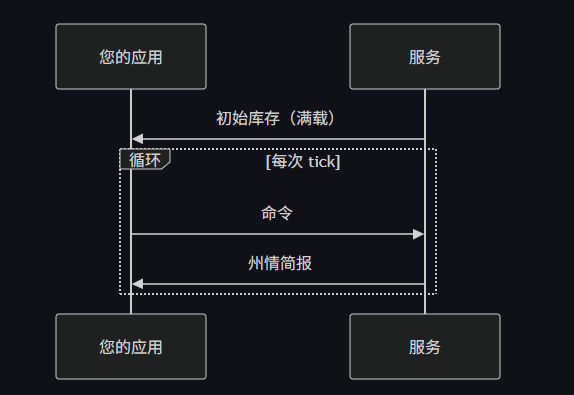
没有轮询,没有订阅,也没有带外推送。发送频率完全由您的发送速率决定。
步骤1一初始库存(服务发送的首条消息)
连接时,该服务会发送一个 完整快照 包含 config, state, 以及 status 对于每个检测到的设备:
{
  "session_id": 7,
  "inverse3": [
    {
      "device_id": "049D",
      "config": {
        "type": "inverse3",
        "port": "COM12",
        "device_info": { "major_version": 7, "minor_version": 4, "id": "049D", "device_type": 4, "uuid": "…" },
        "extended_device_id": "…",
        "extended_firmware_version": "…",
        "gravity_compensation": { "enabled": true, "scaling_factor": 1.0 },
        "handedness": "right",
        "streaming_mode": "USB",
        "torque_scaling": { "enabled": true },
        "home_return": { "enabled": false },
        "preset": "defaults",
        "basis": { "permutation": "XYZ" },
        "mount": { "position": { "x": 0, "y": 0, "z": 0 }, "rotation": { "w": 1, "x": 0, "y": 0, "z": 0 }, "scale": { "x": 1, "y": 1, "z": 1 } },
        "filters": {
          "force_gate": { "gain": 0.3 },
          "damping": { "scalar": 0.0 }
        }
      },
      "state": {
        "cursor_position": { "x": 0.0, "y": -0.12, "z": 0.15 },
        "cursor_velocity": { "x": 0.0, "y": 0.0, "z": 0.0 },
        "angular_position": { "a0": 0.0, "a1": 0.0, "a2": 0.0 },
        "angular_velocity": { "a0": 0.0, "a1": 0.0, "a2": 0.0 },
        "body_orientation": { "w": 1.0, "x": 0.0, "y": 0.0, "z": 0.0 },
        "current_cursor_force": { "x": 0.0, "y": 0.0, "z": 0.0 },
        "current_cursor_position": { "x": 0.0, "y": 0.0, "z": 0.0 },
        "current_angular_torques": { "a0": 0.0, "a1": 0.0, "a2": 0.0 },
        "current_angular_position": { "a0": 0.0, "a1": 0.0, "a2": 0.0 },
        "control_domain": "cartesian",
        "control_mode": "idle",
        "transform": { "position": { "x": 0, "y": 0, "z": 0 }, "rotation": { "w": 1, "x": 0, "y": 0, "z": 0 }, "scale": { "x": 1, "y": 1, "z": 1 } },
        "transform_velocity": { "position": { "x": 0, "y": 0, "z": 0 }, "rotation": { "w": 1, "x": 0, "y": 0, "z": 0 }, "scale": { "x": 0, "y": 0, "z": 0 } }
      },
      "status": {
        "calibrated": true,
        "in_use": false,
        "power_supply": true,
        "ready": true,
        "started": true
      }
    }
  ],
  "verse_grip": [],
  "wireless_verse_grip": []
}
这三个区块的更新频率各不相同:
| 模块 | 包含内容 | 修改内容 |
|---|---|---|
| config | 固件信息、预设、基准、安装、滤镜 | 很少一一仅在明确修改配置时 |
| state | 位置、速度、力、方向、转换 | 每次脉冲(高频) |
| status | 就绪、校准、供电、使用中 | 偶尔(很少) |
步骤2一发送您的第一个命令
解析初始库存以查找您的设备 ID,然后发送一条消息,其中包含您的会话配置文件、任何初始配置和/或控制命令:
{
  "session": {
    "configure": {
      "profile": { "name": "co.haply.inverse.tutorials:hello-floor" }
    }
  },
  "inverse3": [
    {
      "device_id": "049D",
      "configure": {
        "preset": { "preset": "arm_front_centered" }
      },
      "commands": {
        "set_cursor_force": { "vector": { "x": 0.0, "y": 0.0, "z": 0.0 } }
      }
    }
  ]
}
步骤3一后续状态更新
首次交互后,该服务仅发送 state + status (无 config) 除非配置变更触发了完整快照的推送:
{
  "session_id": 7,
  "inverse3": [
    {
      "device_id": "049D",
      "state": { "cursor_position": { … }, "cursor_velocity": { … }, … },
      "status": { "ready": true, "calibrated": true, … }
    }
  ]
}
步骤4一重复
发送一条命令 → 接收状态更新。该循环将以您的发送速率持续进行。
configure vs commands
您发出的消息中的每个设备条目可以包含两个映射:
| 地图 | 目的 | 坚持 |
|---|---|---|
| configure | 单次拍摄设置:预设、基底、卡口、滤镜、模块配置 | 铭记于心,直至改变 |
| commands | 每时钟周期控制:力、位置、转矩 | 用过一次,便不再想起 |
参见 会话配置 查看 完整列表 configure 键,以及 控制命令 用于 commands 条目。
set_transform 是一个特例;set_transform 居住在…… commands 但 持久的 — 该服务 会保留上一个值,直到您发送新值为止。这是因为它的用途是 场景导航,在相机移动时,您会流式传输变换数据,但希望在两次点击之间,上一个位置保持不变。
(《世界人权宣言》)execute 标志
任何 configure 或 commands 条目可以包含 "execute": false 以提供该服务 解析和验证 不应用该有效载荷。
{
  "inverse3": [{
    "device_id": "049D",
    "configure": {
      "preset": { "preset": "arm_front", "execute": true },
      "damping": { "scalar": 0.0, "execute": false }
    }
  }]
}
这对于……很有用 基于反射的序列化器 (例如,Unity的 JsonUtility) 始终输出所有字段:将未使用的条目设置为 execute: false 这样它们就不会覆盖实际的配置。默认值是 true — 省略该标志表示 “按常规应用”。
警告
probe_position 和 probe_orientation 是仅用于监控的保持活动连接,适用于不发送控制命令的会话(例如Haply )。如果您的会话已经发送 set_cursor_force, set_cursor_position等, 不要也... 发送探测器 — 设备状态已包含在每个响应中。将两者混合使用 既会浪费带宽,还可能触发 session-probe-dropped 活动。
如果某个命令似乎没有生效,可能是字段名称有误。该服务目前会无提示地忽略未识别的 JSON 键。请检查服务日志,并对照API 参考文档核对字段名称。此行为计划在未来版本中进行更改。